
The four stats on the Shovel tab
The Shovel tab in your Upgrades menu offers four primary upgrades. Each upgrade controls a distinct physical attribute:
- DIG SIZE modifies
Radius, expanding the physical excavation footprint of each strike. - SWING SPEED modifies
Swing time, reducing the time delay required between consecutive hits. - REACH modifies
Range, increasing the distance from which your tool can connect with mountain blocks. - YIELD modifies
Stones, increasing the multiplier applied to stones produced from excavated rock.
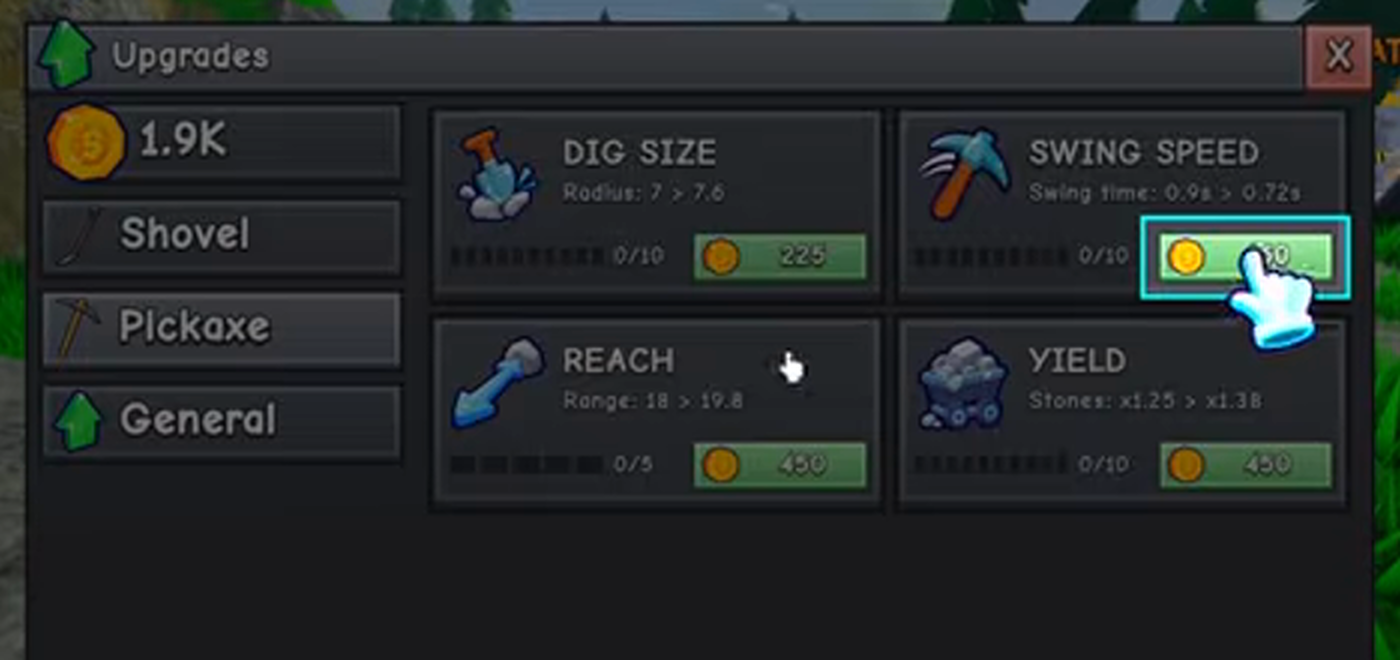
Look at the panel values recorded at timestamp 00:03:14 in the MBT gameplay video. This frame confirms level 0 base stats, target level 1 stats, and initial purchase costs. It does not show costs beyond level 1.
The following table compares the four Shovel upgrades using in-game panel values recorded across early gameplay frames:
| Stat name | In-game metric | Level 0 value | Level 1 value | Max level | Level 0 price (00:03:14) | Level 1 price (00:03:2x) |
|---|---|---|---|---|---|---|
| DIG SIZE | Radius | 7 | 7.6 | 10 | 228 Cash | 390 Cash |
| SWING SPEED | Swing time | 0.9s | 0.72s | 10 | 430 Cash | 390 Cash |
| REACH | Range | 18 | 19.8 | 5 | 430 Cash | 795 Cash |
| YIELD | Stones | x1.25 | x1.38 | 10 | 430 Cash | 795 Cash |
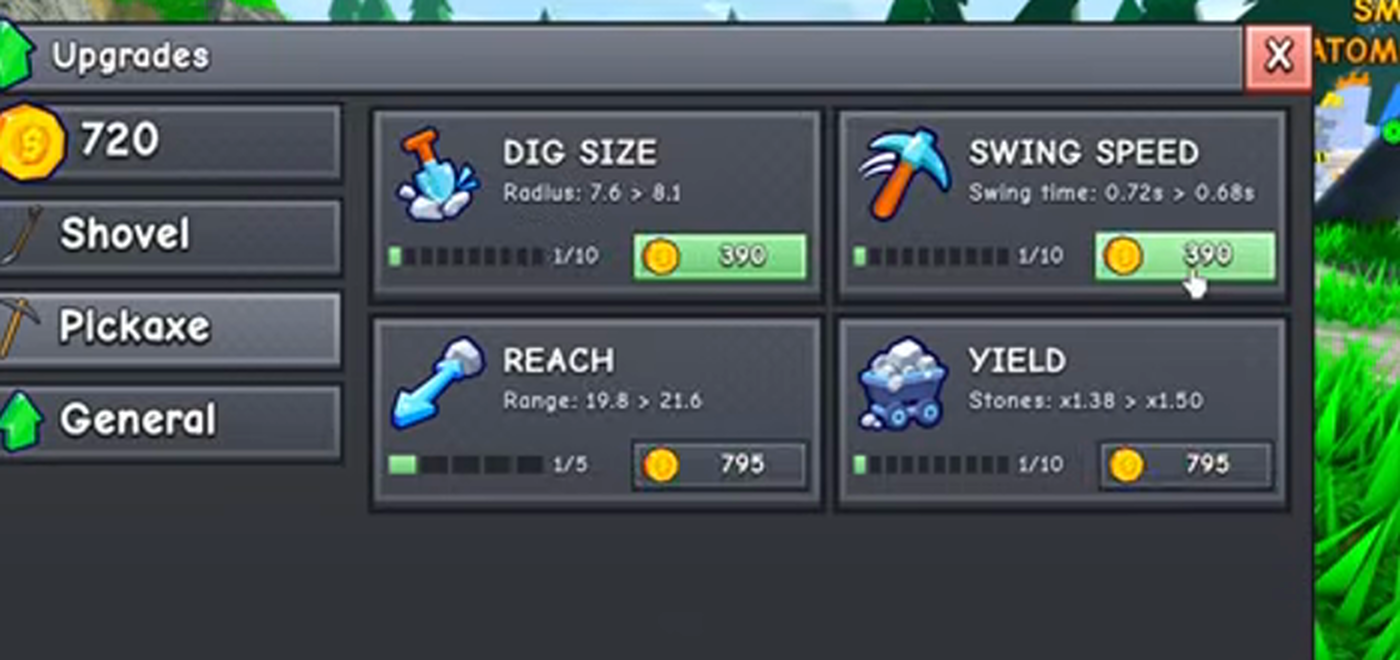
Look at the same tab recorded at timestamp 00:03:2x. This frame confirms level 1 stats and second-tier prices, including the 390 Cash cost for DIG SIZE and SWING SPEED, and the 795 Cash cost for REACH and YIELD. It does not provide a general pricing formula for subsequent levels.
Understanding the math behind the display numbers
The game displays raw values on its upgrade cards. To understand their practical effect, we performed direct arithmetic on the displayed numbers:
- SWING SPEED reduces swing time from 0.9s to 0.72s. In frequency terms, this increases your swing rate from 1.11 swings per second to 1.39 swings per second, which is a 25% increase in attack frequency.
- DIG SIZE increases radius from 7 to 7.6. That represents an 8.6% increase in linear radius. Calculating circle area where the area of a circle grows with the square of its radius shows an excavation surface gain of roughly 18%.
- YIELD increases the stone multiplier from x1.25 to x1.38. That is a net 10.4% increase in stone yield per strike.
- REACH increases range from 18 to 19.8. That provides an exact 10% increase in striking distance.
These percentage gains represent our own arithmetic calculations based on numbers displayed in the menu. They are not official formulas published by Greedy Inc. Furthermore, the game does not disclose the baseline Cash value per individual stone.
Upgrade priority by gameplay bottleneck
Choose your next purchase by identifying what slows down your current run:
- You cannot reach high blocks: Buy REACH first. Default range forces you to jump repeatedly to hit overhead blocks. Raising range from 18 to 19.8 lets you mine continuously while standing on flat ground.
- You break blocks too slowly: Buy SWING SPEED. Dropping your swing cooldown from 0.9s to 0.72s delivers 25% more hits in the same timeframe.
- Your backpack fills up too fast: Pause YIELD upgrades. Generating more stones per block overfills small starting canisters. Invest in DIG SIZE or SWING SPEED instead so you mine more ground per trip, or review our money guide to balance earnings.
- You lack Cash for higher tiers: Focus on DIG SIZE. At 228 Cash for level 0 and 390 Cash for level 1, DIG SIZE remains the most affordable way to increase clearing efficiency.
Six-step recommended upgrade order
If you prefer a direct sequence without evaluating bottlenecks, follow this six-step progression:
- Buy DIG SIZE level 1 for 228 Cash. This gives you 7.6 radius immediately.
- Buy SWING SPEED level 1 for 430 Cash. This cuts swing delay down to 0.72s.
- Buy REACH level 1 for 430 Cash. This extends your hitting range to 19.8.
- Buy DIG SIZE level 2 for 390 Cash. This expands radius further to 8.1.
- Buy SWING SPEED level 2 for 390 Cash. This drops swing time to 0.68s.
- Buy YIELD level 1 for 430 Cash. This raises stone yield to x1.38 once your digging rhythm is established.
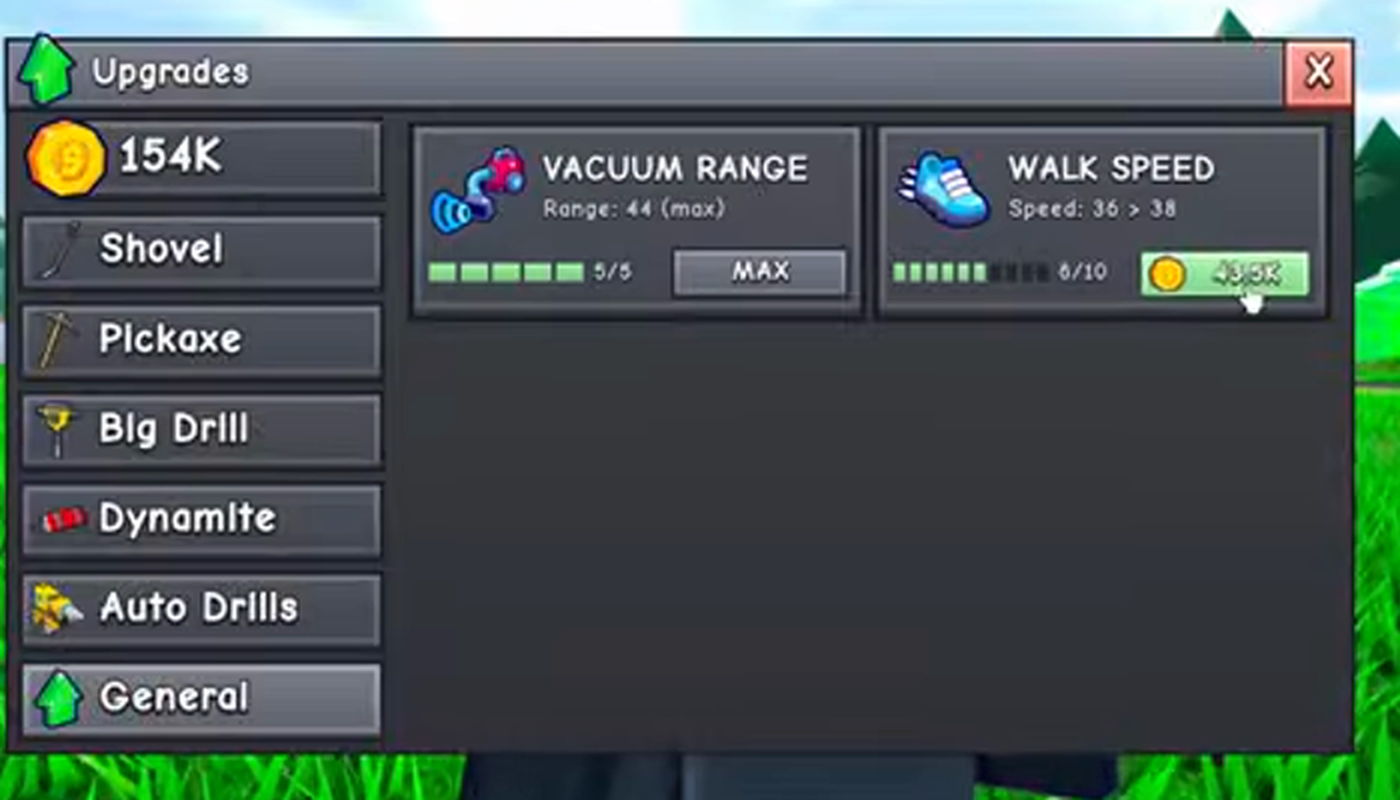
At a later stage the same menu lists every tool you own. The next section maps those tabs, and the panel it quotes shows VACUUM RANGE maxed at Range: 44 (5/5) with WALK SPEED at 9/10 (Speed: 42 to 44).
If you have spare Gems or Robux, you can also check our gems guide for account-wide bonuses, or read game passes compared to see how Fast Vacuum stacks with tool upgrades.
Every tab in the Upgrades menu
The menu is organised by tool, not by stat. Once the later tools are unlocked, the left edge lists seven tabs: Shovel, Pickaxe, Big Drill, Dynamite, Drill Rocket, Auto Drills and General. Each tab sells its own upgrades.
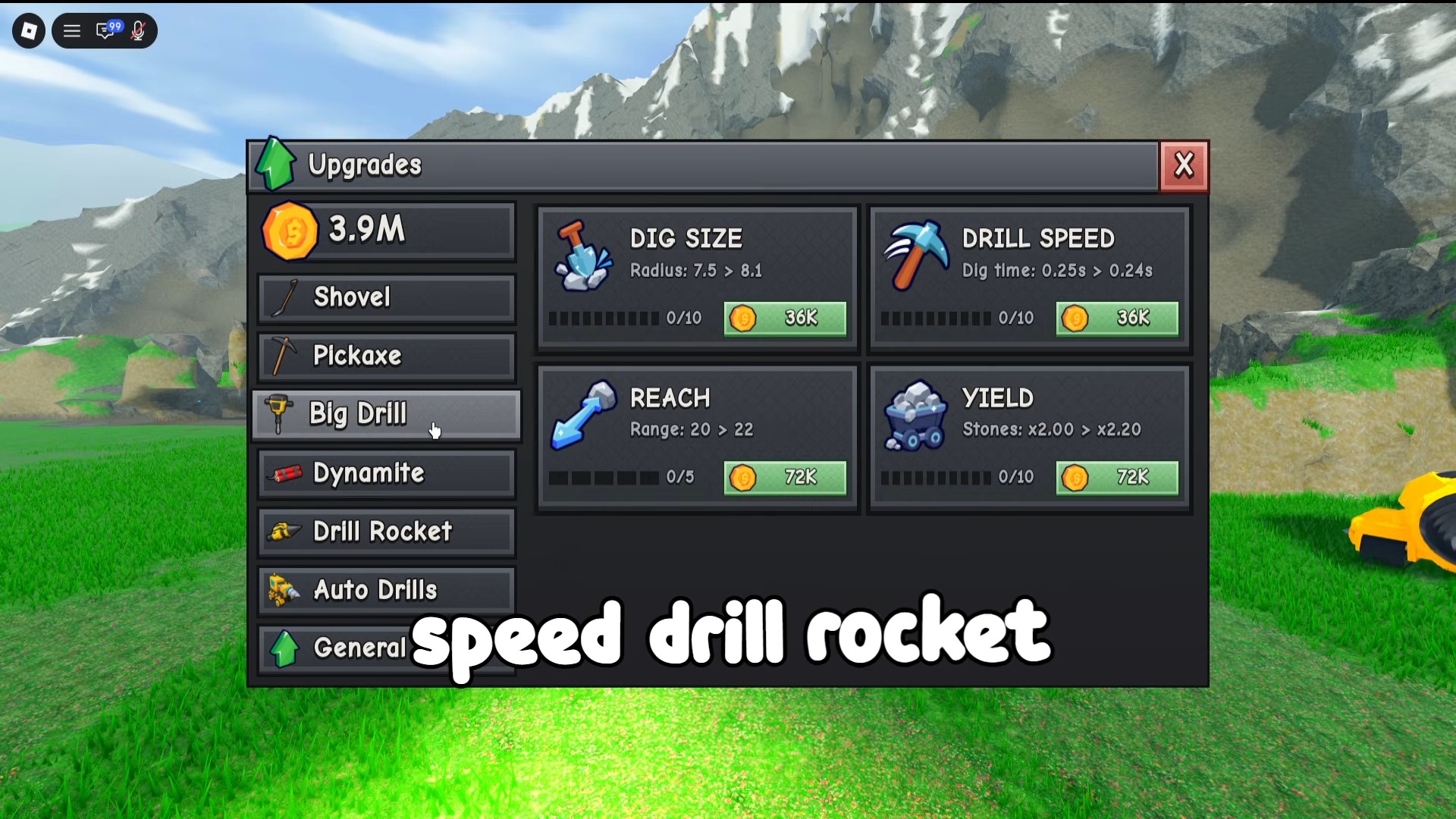
Look at the left column of this frame, recorded at 05:27 in the 20 November 2026 guide video. It shows the seven tab names, with the Big Drill tab open, so the four cards on the right belong to that tool at 0/10 progress and are priced 36K, 36K, 72K and 72K Cash. The frame does not show the Pickaxe tab or what it sells.
| Tab | What the tab sells | One reading (20 Nov 2026) |
|---|---|---|
| Shovel | DIG SIZE (Radius), SWING SPEED (Swing time), REACH (Range), YIELD (Stones) | DIG SIZE 7 to 7.6 for 228 Cash at 0/10 |
| Pickaxe | not recorded here | not recorded here |
| Big Drill | DIG SIZE (Radius), DRILL SPEED (Dig time), REACH (Range), YIELD (Stones) | DIG SIZE 7.5 to 8.1 for 36K Cash at 0/10 |
| Dynamite | BLAST SIZE (Radius), RELOAD (Reload), YIELD (Stones), CHAIN (Charges) | BLAST SIZE 20 to 21.6 for 180K Cash at 0/10 |
| Drill Rocket | DRILL SIZE (Radius), RELOAD (Reload), YIELD (Stones), TUNNEL LENGTH (Length) | TUNNEL LENGTH 110 to 121 for 900K Cash at 0/8 |
| Auto Drills | DRILL SPEED (Dig time), DRILL POWER (Hole size), DRILL MOTOR (Drive speed), DRILL YIELD (Stones), DRILL CAPACITY (Capacity) | DRILL POWER 17.8 to 18.7 at 6/10 for 2M Cash |
| General | VACUUM RANGE (Range), WALK SPEED (Speed) | VACUUM RANGE 44 (max) at 5/5, WALK SPEED 42 to 44 at 9/10 for 600K Cash |
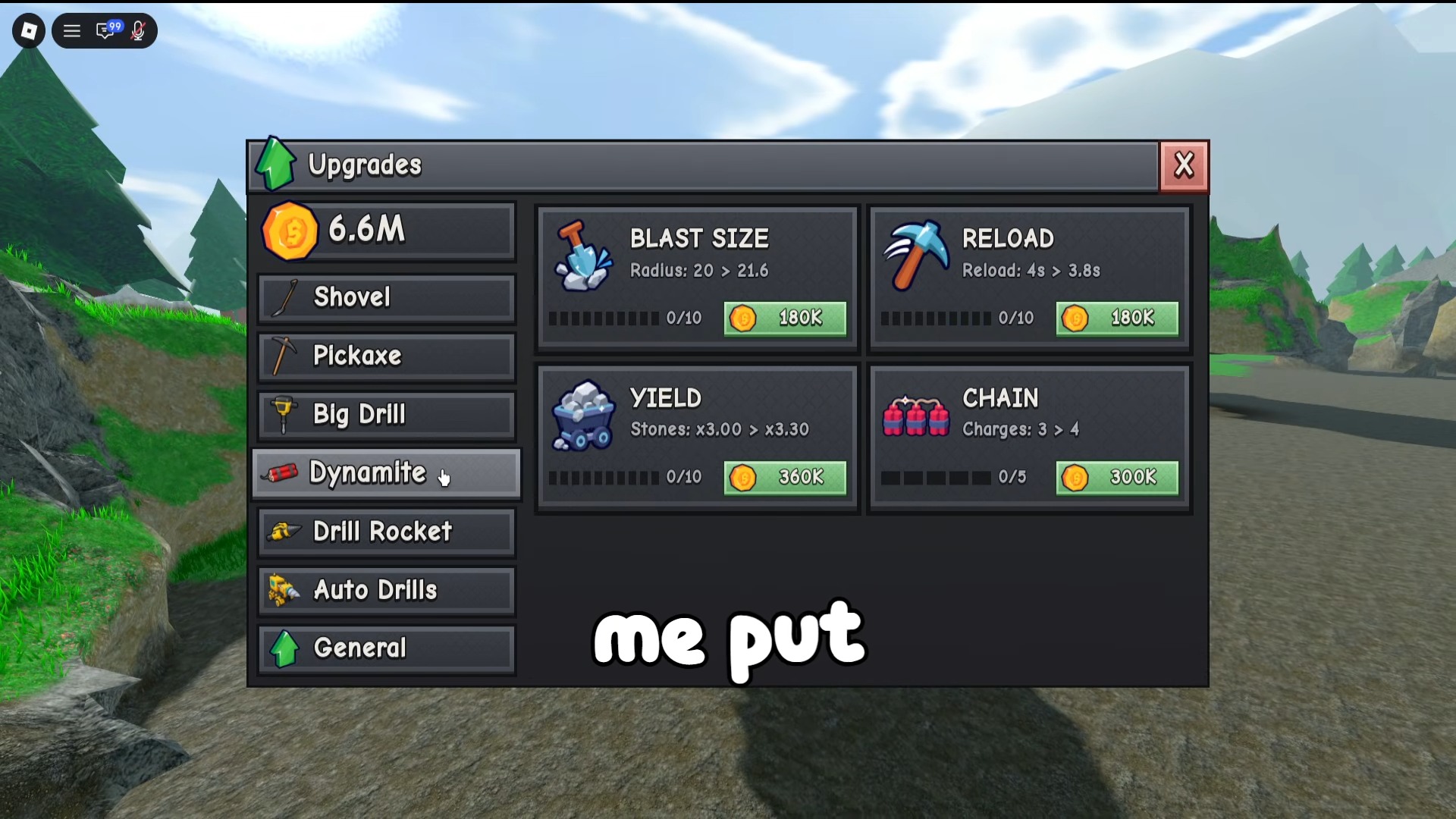
This frame, recorded at 07:32 in the same video, opens the Dynamite tab. The four cards are BLAST SIZE, RELOAD, YIELD and CHAIN, priced 180K, 180K, 360K and 300K Cash at 0/10, 0/10, 0/10 and 0/5. These are one player's panel values on that date, not a published price list.
Tools arrive by two routes, and the screen keeps score of one of them. The top right corner tracks a purchase task: Buy the Big Drill, with a counter shown as 0 / 10K, and later Buy the Rocket Bomb, with counters such as 1M / 7.5M. The Shop sells tool sets for Robux instead: the Big Drill card lists 4.5K Cash as instant cash next to a 19 R$ button, Dynamite lists 600 Gems and 22.5K Cash next to 79 R$, and Rocket Bomb lists 3 Atom Bombs and 2,000 Gems next to 199 R$.
What the task counter measures, the Pickaxe tab, and the Cash price of each tool inside this menu were not recorded here.
Missing price curves on higher tiers
We have documented exact in-game prices for level 0 and level 1 on the Shovel tab. Later tier costs are not recorded here because players in available recordings purchased multiple upgrades between frames. Always rely on the live price displayed on your own in-game card rather than guessing future costs.
What to avoid buying early
Do not pour all your initial Cash into YIELD. Increasing your stone multiplier before upgrading your radius or collection range creates piles of loose stones that you cannot gather quickly.
Similarly, do not buy expensive higher tier single-stat levels while cheaper foundational upgrades remain unpurchased. Maxing out a single stat leaves your character unbalanced and slows down your net clearing rate.